OpenClaw系列第30课:插件开发入门 - SDK 概览
OpenClaw系列第30课:插件开发入门 - SDK 概览
Kai这是「OpenClaw 教程课程」第 30 课。
上一课我们学会了自己写 Skill,把可复用的工作方法沉淀下来。今天继续往下走:当你不只是想教 Agent 怎么做,而是想给 OpenClaw 增加新能力时,就要进入 Plugin 的世界。
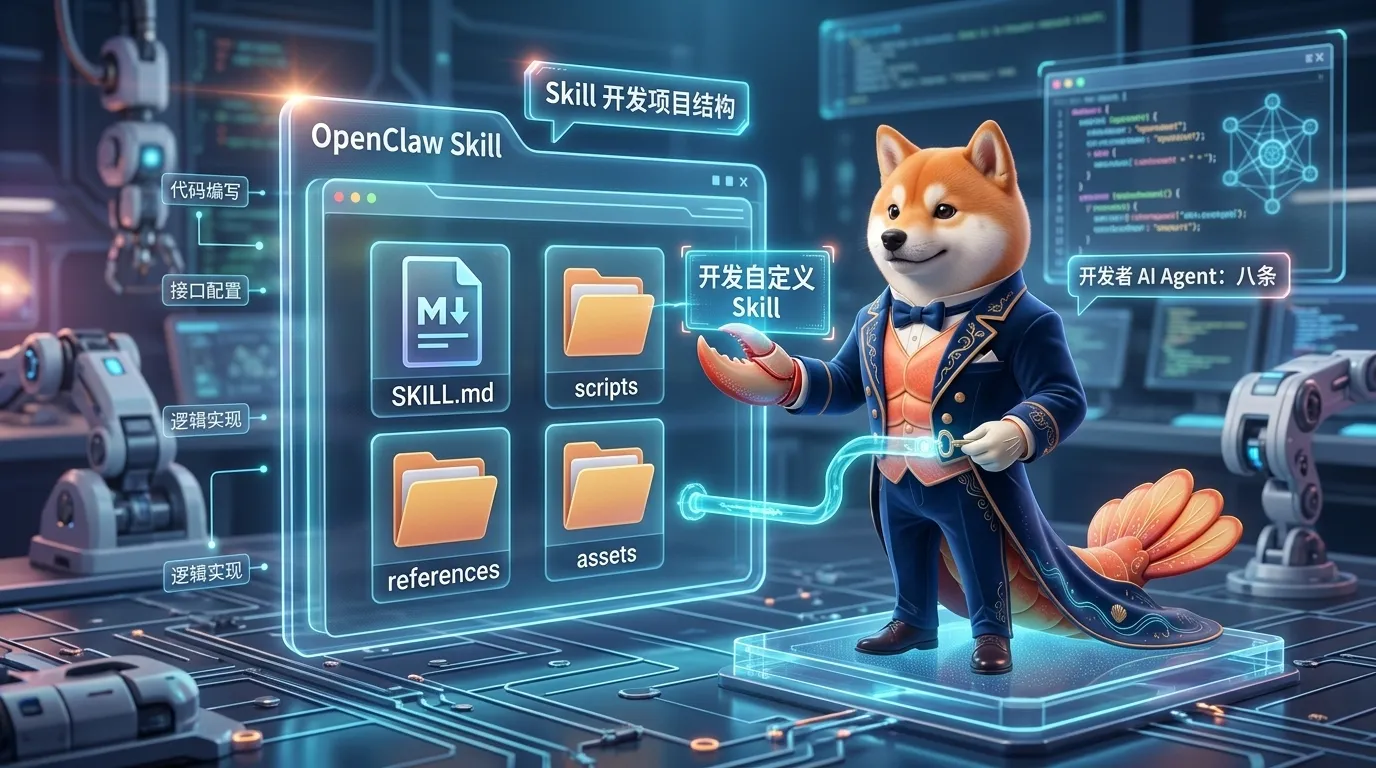
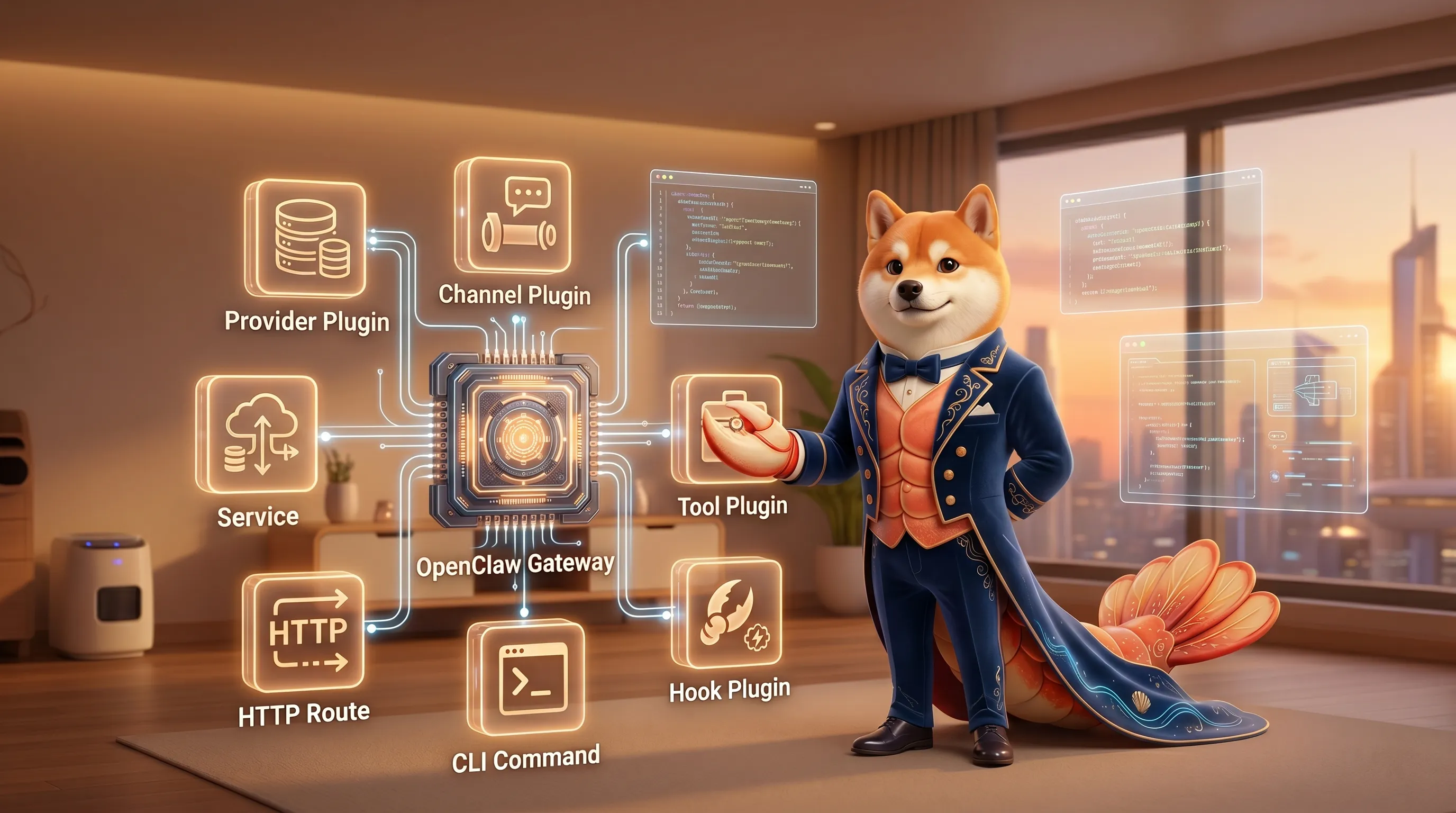
图:OpenClaw Plugin 可以扩展 provider、channel、tool、hook、HTTP route、CLI、service 等能力,是比 Skill 更靠近系统能力层的扩展方式。
第 29 课我们讲过:
Skill 是可复用工作方法。
它解决的是:
1 | 这类任务应该怎么做? |
但有些需求,Skill 解决不了。
比如:
- 接入一个新的 LLM provider
- 接入一个新的聊天渠道
- 增加一个真正的 agent tool
- 拦截工具调用并要求审批
- 增加 Gateway HTTP route
- 增加 CLI 子命令
- 增加后台 service
- 增加 image / video / music generation provider
- 增加 web search / web fetch provider
这些不是“写一套说明”就能完成的。
它们需要把代码注册到 OpenClaw 运行时。
这就是 Plugin。
这一课先不写复杂 provider,也不从零做完整 channel。
我们先建立插件开发的心智模型:
Plugin 是给 OpenClaw 增加系统能力的扩展包。
一、先说结论:Skill 教方法,Plugin 加能力
最容易混的是 Skill 和 Plugin。
你可以这样区分:
| 对比 | Skill | Plugin |
|---|---|---|
| 主要作用 | 教 Agent 怎么做事 | 给 OpenClaw 增加能力 |
| 主要文件 | SKILL.md |
openclaw.plugin.json + TypeScript entry |
| 是否需要写代码 | 不一定 | 通常需要 |
| 能不能注册工具 | 不能直接注册 runtime tool | 可以 api.registerTool |
| 能不能接新渠道 | 不能 | 可以 api.registerChannel |
| 能不能接新 provider | 不能 | 可以 api.registerProvider |
| 适合场景 | 固定流程、规范、检查清单 | 新工具、新服务、新通道、新模型能力 |
简单说:
1 | Skill = 方法说明书 |
如果你只是想让 Agent 写博客更稳定,写 Skill。
如果你想让 OpenClaw 多一个真正的 my_tool,写 Plugin。
如果你只是想让 Agent 按固定流程调用已有 web_search、exec、browser,写 Skill。
如果你想接入一个新的搜索 API,并让它变成 OpenClaw tool/provider,写 Plugin。
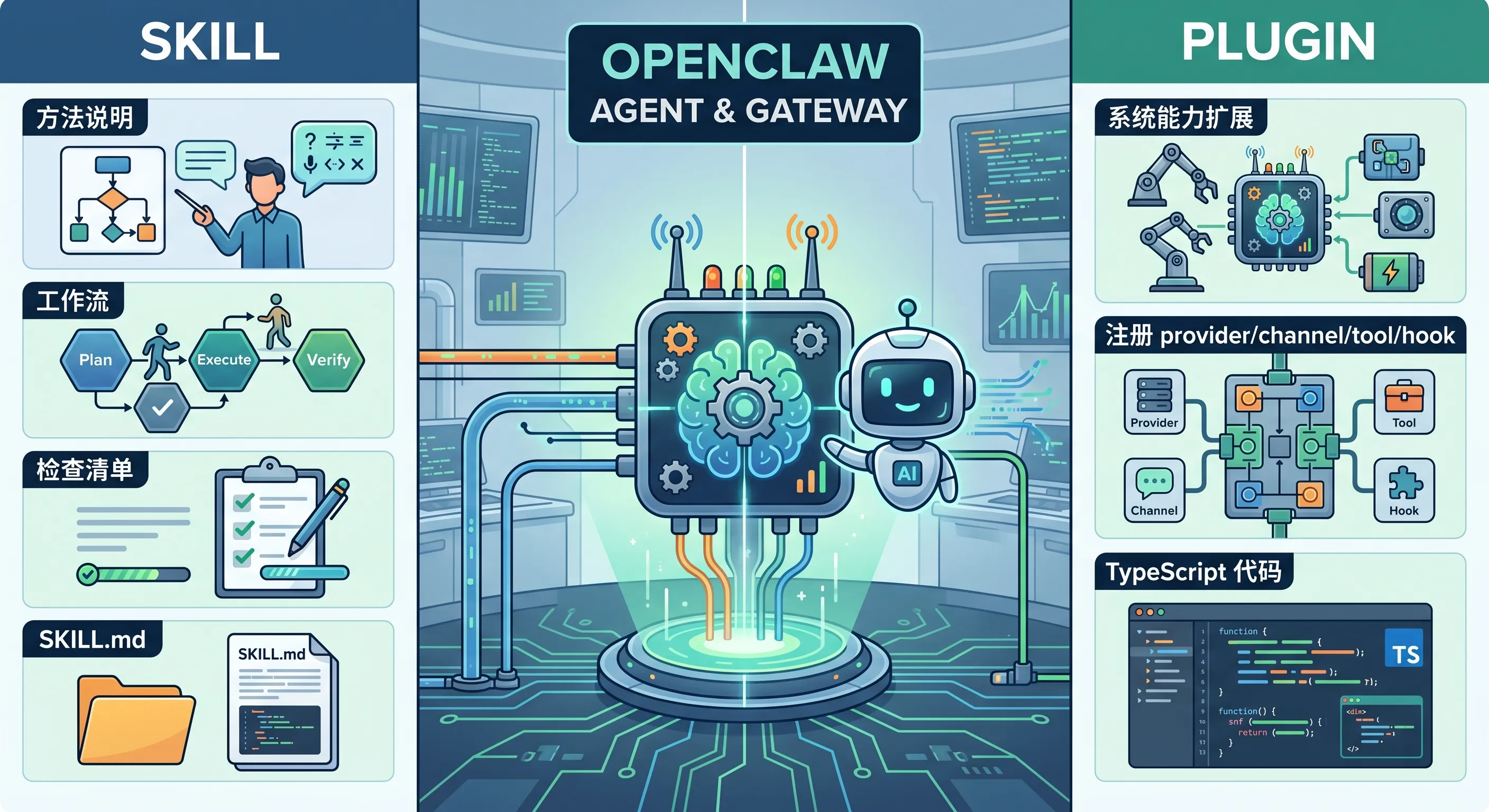
图:Skill 更像流程说明,Plugin 更像系统扩展。Skill 指导已有能力,Plugin 可以注册新能力。
二、Plugin 能扩展什么?
OpenClaw Plugin SDK 的注册 API 很多。
不用一开始全记住。
先看大类。
1)Provider 类
用于接入模型或生成服务。
常见注册方法:
1 | api.registerProvider(...) |
适合:
- 新 LLM provider
- 自建 OpenAI-compatible endpoint
- 新 TTS / STT provider
- 新图片生成服务
- 新视频生成服务
- 新 web search provider
2)Channel 类
用于接入消息平台。
1 | api.registerChannel(...) |
适合:
- 新聊天平台
- 企业内部 IM
- 自建消息系统
- webhook-style channel
3)Agent Tool 类
用于增加 Agent 可调用工具。
1 | api.registerTool(...) |
适合:
- 查询内部系统
- 调用公司 API
- 生成特定报告
- 操作某个业务服务
- 封装固定计算逻辑
4)Hook 类
用于拦截或观察 OpenClaw 生命周期。
常见:
1 | api.on("before_tool_call", ...) |
适合:
- 工具调用前加审批
- 发消息前改写格式
- 收消息后做审计
- Agent 结束后记录指标
- 心跳时补充上下文
5)基础设施类
比如:
1 | api.registerHttpRoute(...) |
适合:
- 增加 Gateway HTTP endpoint
- 增加 Gateway RPC method
- 增加 CLI 命令
- 启动后台服务
三、插件开发的四层结构
OpenClaw 插件系统可以理解成四层。
第一层:Manifest + discovery
OpenClaw 先找到插件。
它会读取插件根目录里的:
1 | openclaw.plugin.json |
注意:这个阶段应该能做 cheap metadata inspection。
也就是不需要启动整个插件 runtime。
第二层:Enablement + validation
OpenClaw 判断插件是否启用、配置是否合法、是否属于某个 exclusive slot。
比如:
- 插件是否 enabled
- configSchema 是否通过
- contracts 是否声明能力
- plugin id 是否有效
第三层:Runtime loading
真正加载插件代码。
插件通过 TypeScript / JavaScript entry 注册能力。
比如:
1 | api.registerTool(...) |
第四层:Surface consumption
OpenClaw 的其他部分开始消费这些能力。
比如:
- tools 出现在 Agent 工具列表里
- provider 出现在模型候选里
- channel 出现在消息系统里
- hook 开始拦截事件
- CLI 命令可用
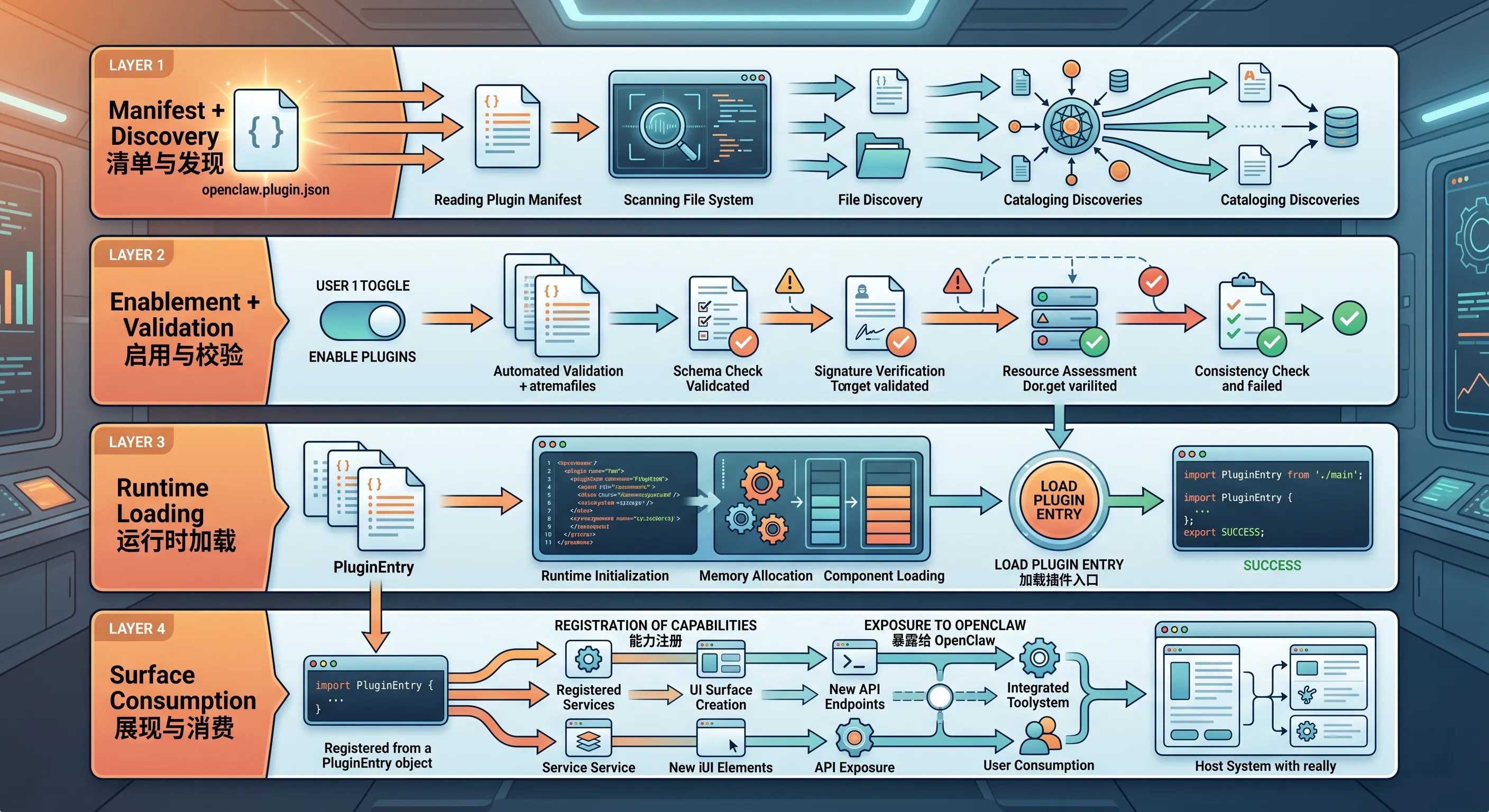
图:插件从 manifest 发现开始,经过启用和配置校验,再加载 runtime,最后把能力暴露给 OpenClaw 各个系统。
四、一个最小 Tool Plugin 长什么样?
OpenClaw 文档里的 quick start 是一个最小 tool plugin。
它通常需要三个东西:
1 | my-plugin/ |
1)package.json
示例:
1 | { |
这里 openclaw.extensions 告诉 OpenClaw 插件入口在哪。
如果你发布外部插件,compat / build 这些版本信息很重要。
2)openclaw.plugin.json
示例:
1 | { |
这里最重要的是:
id:插件 idcontracts.tools:声明这个插件拥有哪个 toolactivation.onStartup:启动时加载configSchema:插件配置 schema
3)index.ts
示例:
1 | import { definePluginEntry } from "openclaw/plugin-sdk/plugin-entry"; |
这个插件做的事很简单:注册一个 my_tool。
但它已经包含插件开发的核心关系:
1 | manifest 声明能力归属 |
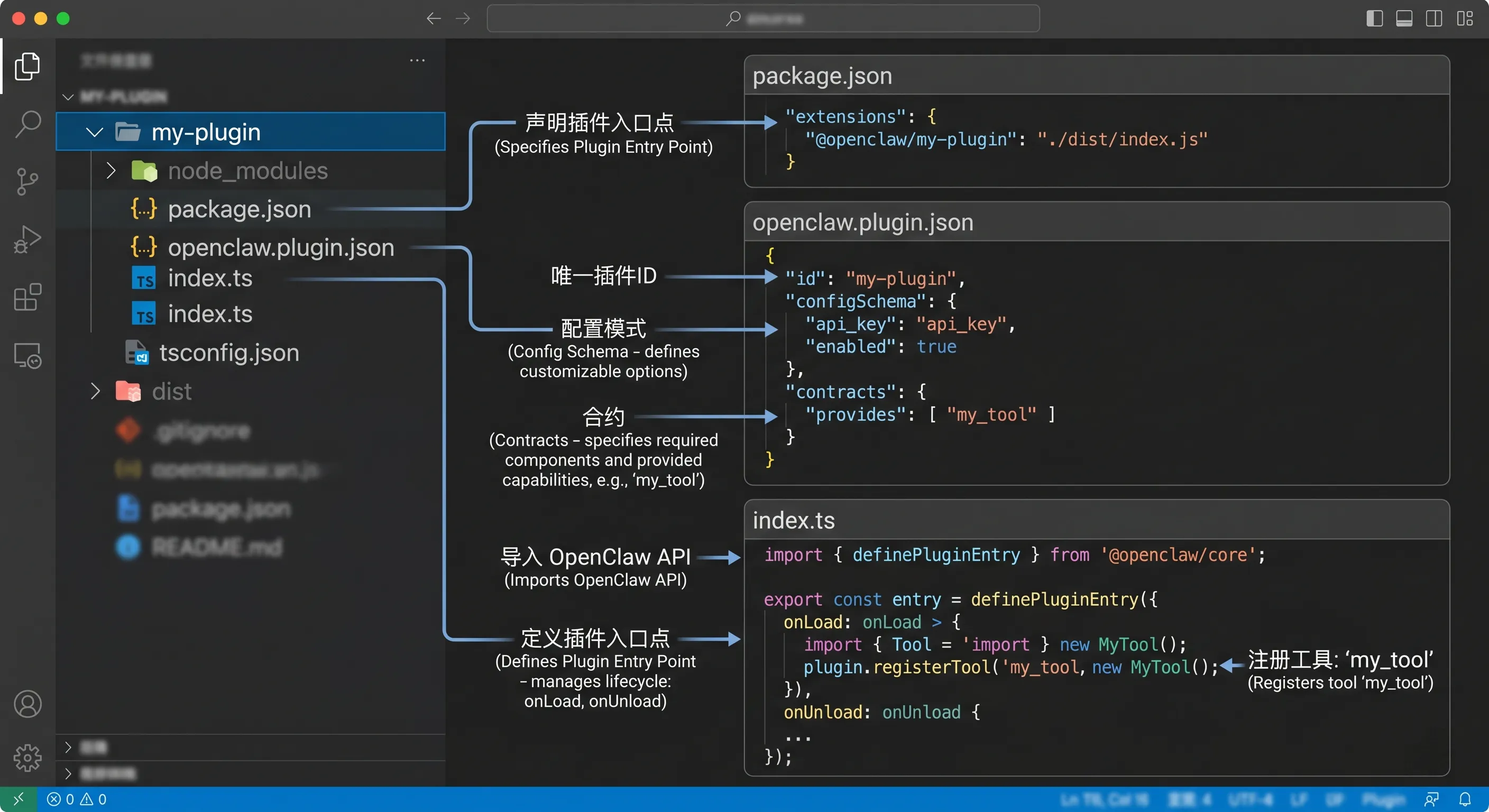
图:一个最小 tool plugin 通常包含 package.json、openclaw.plugin.json 和 index.ts。manifest 声明能力,entry 注册行为。
五、openclaw.plugin.json 是什么?
openclaw.plugin.json 是原生 OpenClaw 插件的 manifest。
文档里说,每个 native OpenClaw plugin 都必须在 plugin root 里带这个文件。
它的作用是:
让 OpenClaw 在不执行插件代码的情况下,先理解这个插件。
它可以描述:
- 插件 id
- 插件名称和描述
- configSchema
- channel / provider ownership
- contracts
- setup metadata
- activation hints
- toolMetadata
- skills directories
- UI hints
很重要的一点:
openclaw.plugin.json不负责注册 runtime 行为。
也就是说,不是在 manifest 里写代码。
manifest 只描述插件。
真正行为在 entry 里:
1 | register(api) { |
六、package.json 和 manifest 分别负责什么?
这两个文件容易混。
package.json
它属于 Node / npm 包层。
它告诉安装和加载系统:
- 包名是什么
- 版本是多少
- 是否 ESM
- OpenClaw extensions 在哪里
- setupEntry 在哪里
- runtimeExtensions 在哪里
- compat / build 信息
- install hint
openclaw.plugin.json
它属于 OpenClaw 插件元数据层。
它告诉 OpenClaw:
- plugin id 是什么
- 配置 schema 是什么
- 拥有哪些 capability
- 哪些 provider / channel / tool 属于它
- 启动和激活提示
- UI 和 setup metadata
一句话:
1 | package.json 管“包怎么被加载” |
七、SDK import 规则:用具体 subpath
Plugin SDK 文档强调:
Always import from a specific subpath.
比如:
1 | import { definePluginEntry } from "openclaw/plugin-sdk/plugin-entry"; |
不要随便 import 一些 channel/provider branded convenience seams。
比如文档提醒,不建议新插件直接用:
1 | openclaw/plugin-sdk/slack |
这些更多是 bundled plugin 维护或 deprecated compatibility 用。
新插件应该优先用 narrow generic SDK contract。
这条规则的意义是:
- 启动更快
- 避免循环依赖
- API 边界更清晰
- 避免依赖偶然导出的内部 helper
八、definePluginEntry 和 defineChannelPluginEntry
插件 entry 常见有两种。
definePluginEntry
用于非 channel 插件。
比如:
- provider plugin
- tool plugin
- hook plugin
- service plugin
- HTTP route plugin
示例:
1 | import { definePluginEntry } from "openclaw/plugin-sdk/plugin-entry"; |
defineChannelPluginEntry
用于消息 channel 插件。
1 | import { defineChannelPluginEntry } from "openclaw/plugin-sdk/channel-core"; |
新手可以先记:
1 | 不是聊天渠道 → definePluginEntry |
九、registrationMode:同一个插件不是每次都 full load
OpenClaw 插件 entry 会看到:
1 | api.registrationMode |
常见模式有:
| mode | 什么时候 | 应该做什么 |
|---|---|---|
full |
正常 Gateway startup | 注册完整 runtime 能力 |
discovery |
只读能力发现 | 注册静态/轻量信息,避免启动 socket/worker |
setup-only |
disabled/unconfigured channel | 只注册 setup 需要的最小表面 |
setup-runtime |
setup flow 需要 runtime | 只注册 setup 需要的轻量 runtime |
cli-metadata |
CLI 帮助/命令元数据 | 注册 CLI descriptors |
这非常重要。
因为插件不应该每次被“发现”时就启动网络连接、后台 worker、长生命周期服务。
正确原则是:
top-level imports 保持无副作用;socket、client、worker、service 放到 full-only 路径。
这可以避免 OpenClaw 只是做 status / setup / discovery 时,插件就偷偷启动重活。
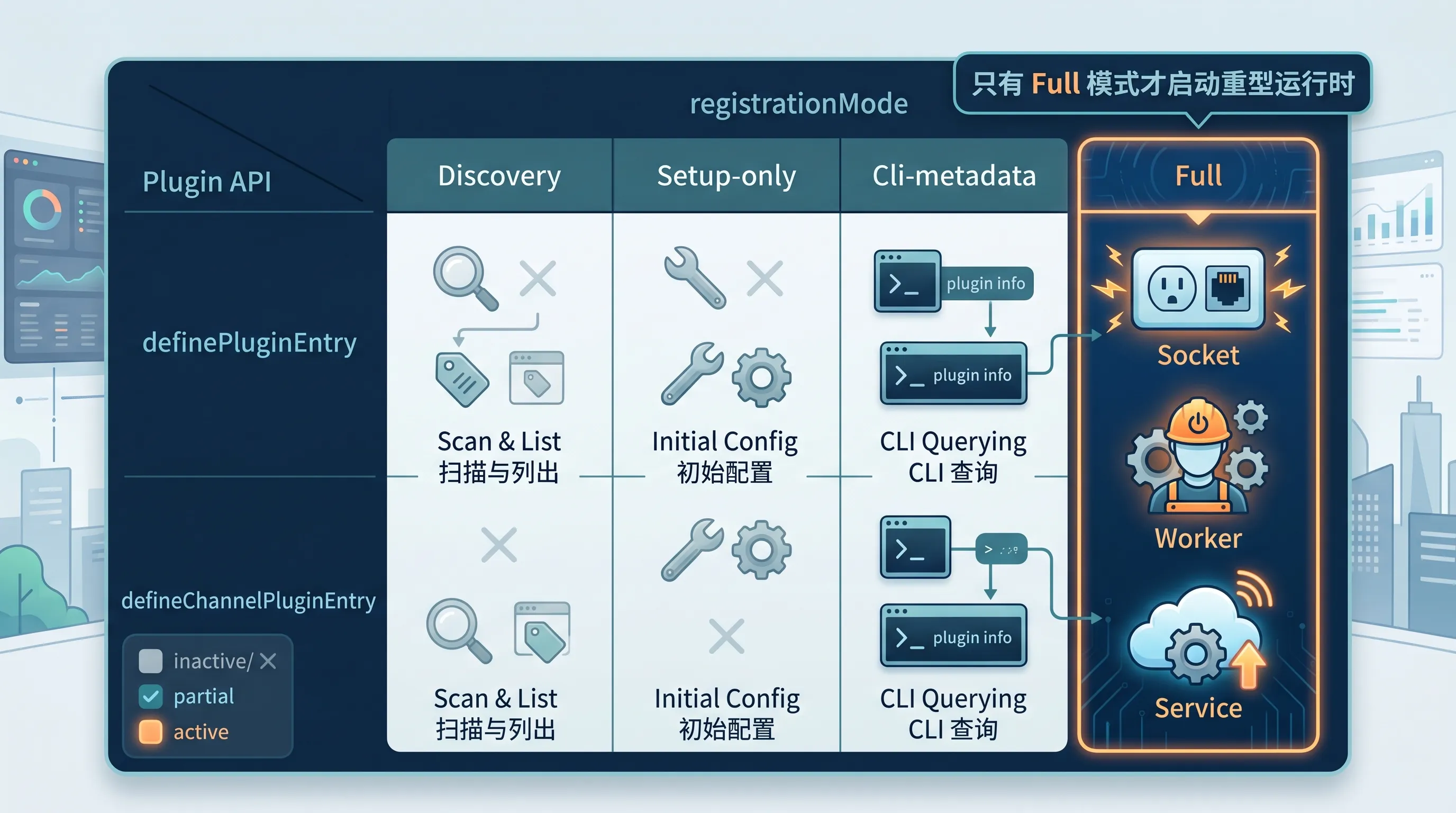
图:插件在 discovery、setup-only、cli-metadata、full 等不同模式下加载,应该避免在非 full 模式启动重型 runtime。
十、插件类型怎么选?
1)想加一个模型服务:Provider Plugin
比如你有一个内部 LLM 服务。
你想让 OpenClaw 像使用 OpenAI / Anthropic 一样使用它。
这时写 provider plugin。
2)想接一个聊天平台:Channel Plugin
比如公司内部 IM。
你想让 OpenClaw 收消息、发消息、处理线程、处理 mentions。
这时写 channel plugin。
3)想给 Agent 一个新动作:Tool Plugin
比如查询内部库存系统。
你想让模型能调用:
1 | inventory_lookup |
这时写 tool plugin。
4)想拦截流程:Hook Plugin
比如每次调用 web_search 前都需要审批。
这时可以写 hook plugin,用:
1 | api.on("before_tool_call", ...) |
5)想增加管理接口:HTTP / Gateway Method / CLI
比如给内部系统一个只读查询 endpoint,或增加 CLI 命令。
可以考虑:
1 | api.registerHttpRoute(...) |
但这类能力要特别注意权限和 auth。
十一、Hook plugin 是什么?
Hook 是一种很强的扩展点。
它允许插件观察或改变 OpenClaw 的某些流程。
比如:
- agent turn
- model call
- tool call
- message received
- message sending
- session lifecycle
- gateway startup
- cron changed
最常见的入门 hook 是:
1 | api.on("before_tool_call", async (event) => { |
它的作用是:
在 web_search 运行前,要求用户批准。
Hook 可以:
- block
- rewrite params
- require approval
- observe result
- cancel message sending
- add prompt context
这很强,也很危险。
所以不要用 hook 偷偷改变用户意图。
要保持:
- 可解释
- 可配置
- 可禁用
- 有日志
- 最小影响范围
十二、Tool Plugin 的安全边界
注册 tool 很容易。
但安全设计不容易。
一个 tool plugin 至少要想清楚:
- 是否会读敏感数据
- 是否会写文件
- 是否会发消息
- 是否会调用外部 API
- 是否会执行命令
- 是否会修改真实业务系统
- 是否需要用户确认
- 是否应该是 optional tool
文档里提到,工具可以 required,也可以 optional。
示例:
1 | api.registerTool( |
对应 manifest 里也应该声明:
1 | { |
如果一个工具会改真实世界状态,我建议默认 optional,并配合 tool policy / approvals。
十三、configSchema:不要接受随便什么配置
每个 native plugin 都需要 configSchema。
最小例子:
1 | { |
注意:
1 | "additionalProperties": false |
这意味着不允许未知配置乱塞进来。
这是好事。
插件配置越严格,排错越容易。
如果你的插件需要 API key,可以在 schema 和 UI hints 里明确:
1 | { |
敏感配置不要随便写进日志,也不要在错误消息里完整打印。
十四、插件可以带 Skills
第 29 课讲过,Skill 是方法包。
插件也可以 ship skills。
manifest 里有:
1 | { |
这很适合:
- 插件提供新工具
- Skill 教 Agent 如何正确使用这个工具
- 长说明不塞进 tool description
比如 browser plugin 可以带一个 browser-automation skill,专门教 Agent 多步骤浏览器操作。
所以插件和 Skill 不是互斥关系。
它们可以组合:
1 | Plugin 提供能力 |
这是很推荐的模式。
十五、插件怎么安装和管理?
常用命令:
1 | openclaw plugins list |
安装插件后,通常要重启 Gateway:
1 | openclaw gateway restart |
然后验证 runtime 是否注册:
1 | openclaw plugins inspect <plugin-id> --runtime --json |
注意:
plugins list是冷 inventory 检查,不证明运行中的 Gateway 已经加载 runtime。
要证明 runtime 表面注册,用 inspect --runtime。
十六、插件测试怎么想?
插件不是写完能编译就完事。
至少要有三类检查。
1)Manifest / config 检查
看:
openclaw.plugin.json是否存在id是否匹配 entryconfigSchema是否严格contracts是否声明已注册工具 / provider / channel- package metadata 是否正确
2)Registration 测试
看插件是否真的注册了:
- tool
- provider
- channel
- hook
- service
- route
可以用 SDK test helpers 或运行时 inspect。
3)行为测试
看实际行为是否符合预期:
- tool 参数 schema 是否正确
- 错误处理是否清晰
- auth 缺失时是否 fail closed
- timeout 是否合理
- 是否泄漏 secret
- 是否支持 dry-run 或只读模式
十七、插件开发时最容易犯的错
1)manifest 没声明 contracts
你注册了 tool,但 manifest 里没写:
1 | "contracts": { "tools": ["my_tool"] } |
OpenClaw 就无法在不加载 runtime 的情况下知道能力归属。
2)plugin id 不一致
openclaw.plugin.json 里是:
1 | "id": "my-plugin" |
但 entry 里写:
1 | id: "myPlugin" |
排错会非常烦。
3)top-level 有副作用
比如文件顶层直接连接外部服务:
1 | const client = await connectToRemoteService(); |
这会让 discovery / setup 阶段也可能触发重型行为。
应该放到 full runtime 路径。
4)工具描述太模糊
1 | description: "Do something useful" |
模型不知道什么时候该用,也不知道边界。
5)错误消息泄漏密钥
比如把完整 API response、headers、token 打进日志。
不行。
6)把插件当 Skill 写
如果只是流程说明,别写插件。
插件带来运行时复杂度、测试成本和安全边界。
十八、Skill、Plugin、Hook、Tool 怎么选?
可以按这张表判断:
| 需求 | 推荐 |
|---|---|
| 让 Agent 按固定流程工作 | Skill |
| 增加一个模型 provider | Provider Plugin |
| 接入新聊天平台 | Channel Plugin |
| 增加 Agent 可调用函数 | Tool Plugin |
| 拦截工具调用或消息流 | Hook Plugin |
| 增加 Gateway HTTP endpoint | Plugin HTTP route |
| 增加 CLI 命令 | Plugin CLI |
| 让某插件能力更好用 | Plugin + Skill |
最常见的入门路线是:
1 | 先写 Skill |
十九、一个推荐学习路线
如果你准备真的写插件,我建议按这个顺序:
第一步:读 SDK overview
先知道能注册什么。
第二步:写最小 tool plugin
不要一上来写 channel。
先写一个:
1 | 输入字符串 → 返回字符串 |
第三步:加 configSchema
让插件配置可验证。
第四步:加错误处理
比如缺配置、缺 auth、超时。
第五步:加 tests
至少测试 registration 和 tool behavior。
第六步:再考虑发布
发布到 ClawHub 或 npm。
第七步:如果需要复杂接入,再学 channel/provider 专门文档
也就是:
sdk-channel-pluginssdk-provider-pluginscli-backend-plugins
二十、插件开发安全清单
写插件前,问自己这些问题:
1 | [ ] 这个需求真的需要 Plugin,而不是 Skill? |
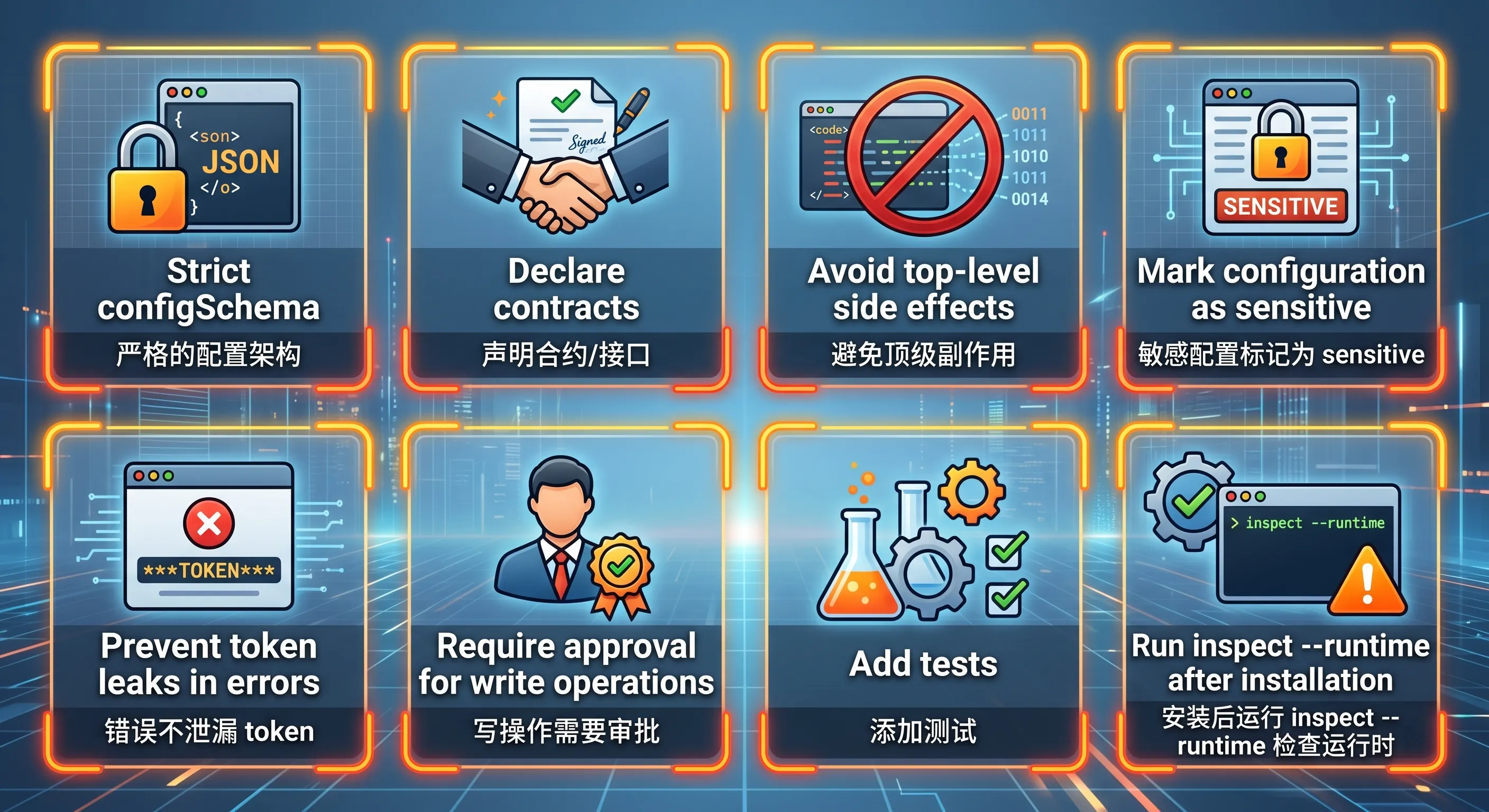
图:插件开发要检查 manifest、configSchema、contracts、top-level side effects、敏感配置、错误处理、测试和 runtime inspect。
二十一、适合新手的提问模板
1)判断该写 Skill 还是 Plugin
1 | 我有一个 OpenClaw 扩展需求,请帮我判断应该写 Skill、Tool Plugin、Provider Plugin、Channel Plugin 还是 Hook Plugin,并说明理由。 |
2)设计最小插件结构
1 | 请帮我设计一个最小 OpenClaw tool plugin,包含 package.json、openclaw.plugin.json、index.ts,并解释每个字段的作用。 |
3)审查 manifest
1 | 请帮我审查这个 openclaw.plugin.json:id、configSchema、contracts、activation、toolMetadata 是否合理,是否能在不加载 runtime 的情况下完成发现和校验。 |
4)审查插件安全性
1 | 请帮我审查这个 OpenClaw 插件的安全边界:是否有 top-level side effects、是否泄漏 secret、tool schema 是否过宽、是否需要 approval、错误处理是否 fail closed。 |
5)测试插件
1 | 请帮我为这个 OpenClaw plugin 设计测试计划:manifest/config 校验、registration 测试、tool behavior 测试、缺配置/缺 auth/timeout 错误测试。 |
6)插件发布前检查
1 | 请帮我做 OpenClaw 插件发布前检查:package metadata、openclaw.plugin.json、runtimeExtensions、compat/build 字段、ClawHub dry-run、安装后 restart 和 inspect --runtime。 |
二十二、这一课最值得记住的一句话
如果今天只记一句话:
Skill 教 Agent 怎么用已有能力,Plugin 给 OpenClaw 增加新能力。
再记一句开发原则:
manifest 负责被发现,entry 负责注册能力,测试负责证明它真的安全可用。
二十三、总结
今天这节课,我们完成了插件开发入门的 SDK 概览:
- Skill 是方法包,Plugin 是能力扩展包。
- Plugin 可以注册 provider、channel、tool、hook、HTTP route、CLI、service 等能力。
- 插件系统有 manifest/discovery、enablement/validation、runtime loading、surface consumption 四层。
- 最小 tool plugin 通常包含
package.json、openclaw.plugin.json、index.ts。 openclaw.plugin.json必须存在,用于不执行代码的配置校验和能力发现。package.json管包和入口,manifest 管插件元数据,entry 管 runtime 行为。- SDK import 应该使用具体 subpath。
- 非 channel 插件用
definePluginEntry,channel 插件用defineChannelPluginEntry。 registrationMode决定插件当前是 discovery、setup 还是 full runtime。- top-level imports 要避免副作用,重型 runtime 放到 full-only 路径。
- 工具插件要有严格 schema、清晰边界和错误处理。
- 插件可以 ship skills,让 Skill 教 Agent 正确使用插件能力。
- 安装插件后要 restart Gateway,并用
plugins inspect --runtime验证。 - 写插件前先问:这个需求真的不能用 Skill 解决吗?
如果第 29 课是把经验写成 Skill,那么第 30 课就是打开了 OpenClaw 的扩展系统大门。
从这里开始,你不只是使用 OpenClaw。
你可以开始给它增加新的能力。
下一课预告
下一课我们会讲:
第 31 课:ACP harness——在 Discord 线程里跑 Codex / Claude Code
会重点讲:
- ACP / ACPX 是什么
- harness 在 OpenClaw 里扮演什么角色
- 为什么它适合把 coding agent 放进 Discord 线程
- Codex / Claude Code 这类 agent runtime 和普通聊天模型有什么区别
- 怎么理解线程、任务、上下文和审批边界
🦞 本文由八条撰写,持续更新中。