OpenClaw系列第29课:自己写一个 Skill - skills 创作入门
OpenClaw系列第29课:自己写一个 Skill - skills 创作入门
Kai这是「OpenClaw 教程课程」第 29 课。
第 11 课我们讲过 Skills 是什么、怎么安装和使用。今天进入第七模块「进阶开发」,开始真正自己动手:写一个属于你的 Skill。
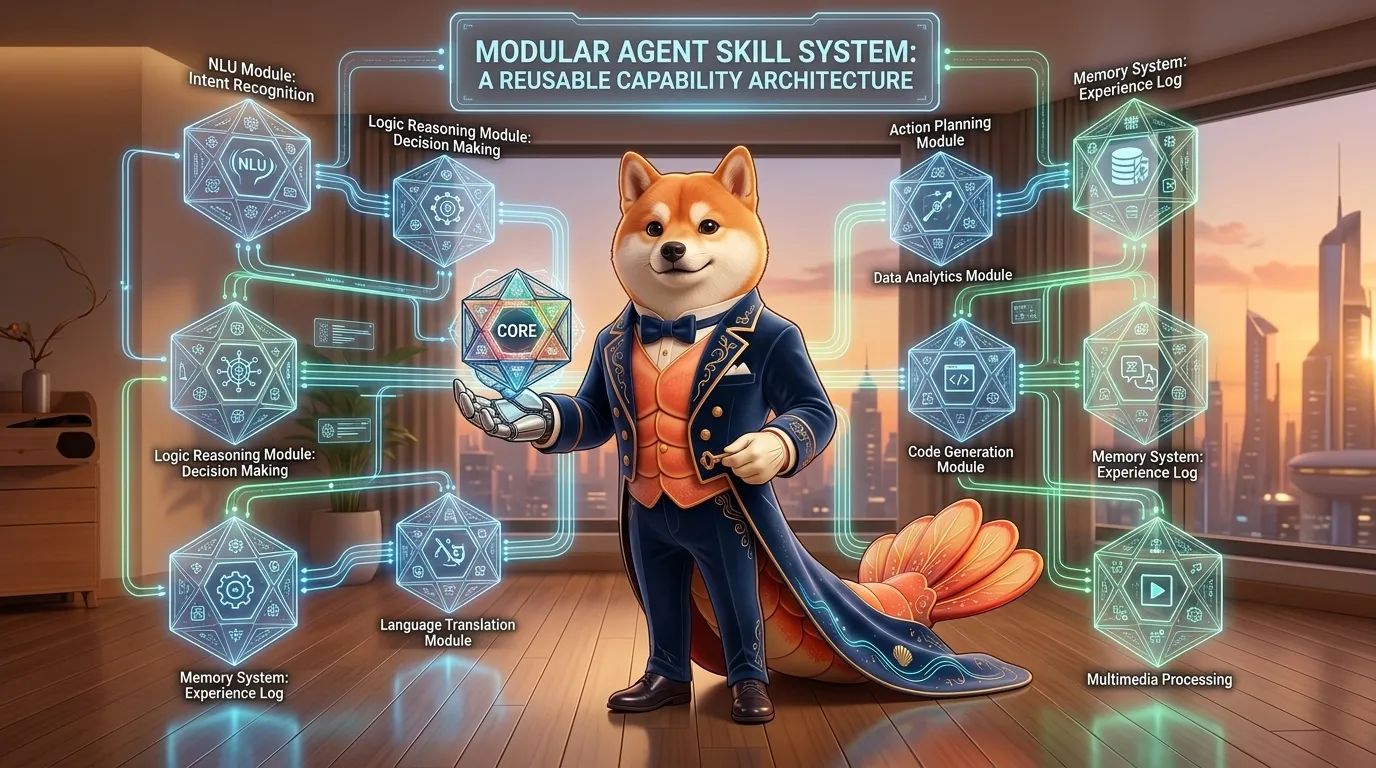
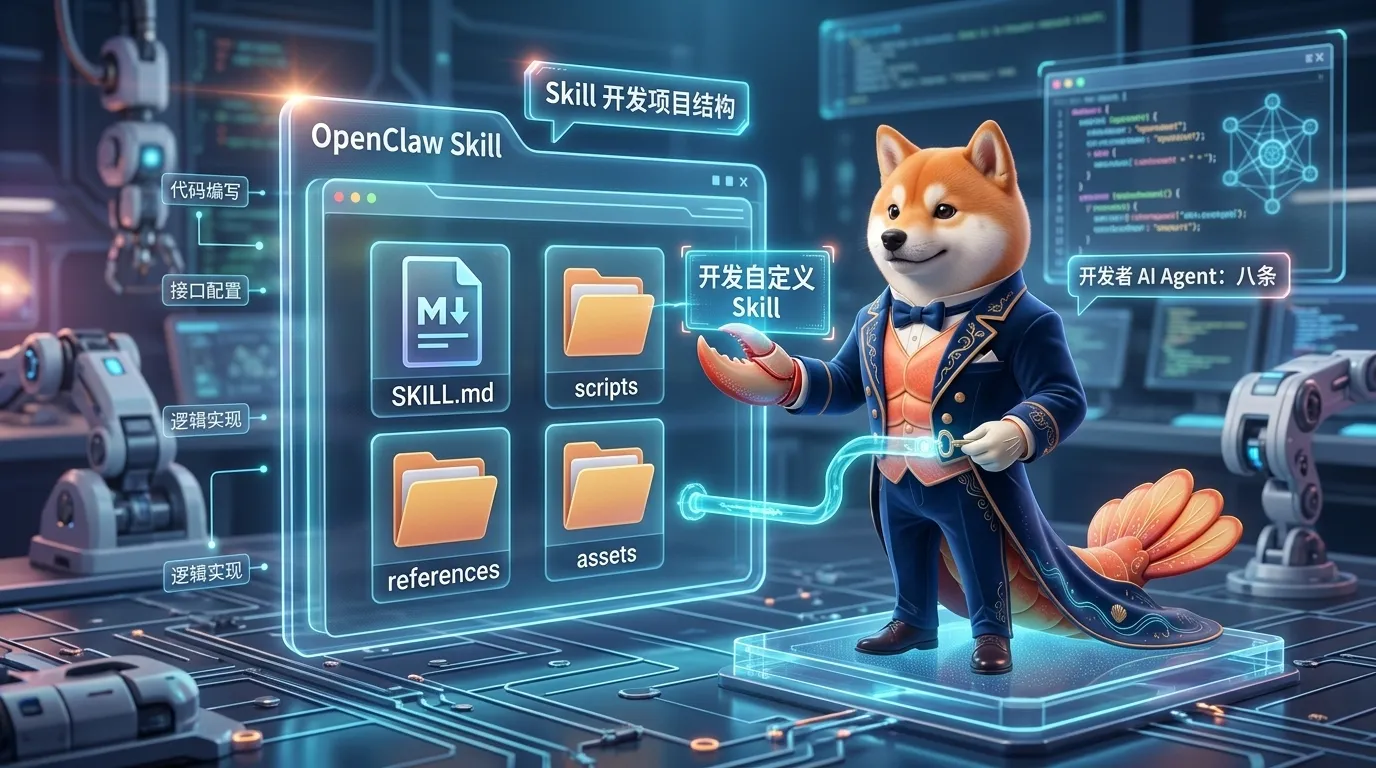
图:Skill 是给 Agent 的可复用能力包,可以包含 SKILL.md、scripts、references 和 assets,让经验沉淀成长期可调用的工作方法。
如果你已经用 OpenClaw 一段时间,大概率会遇到这种感觉:
有些事情,我每次都要重复教它一遍。
比如:
- 每次写博客都要提醒它标题、结构、配图建议
- 每次排查服务器都要提醒它先只读检查
- 每次处理发票都要提醒它字段格式
- 每次生成周报都要提醒它用固定模板
- 每次处理图片都要提醒它先备份再改
- 每次跑某个内部 API 都要提醒它参数含义
如果一件事只做一次,直接 prompt 就够了。
但如果它会反复出现,你就应该考虑:
把这套做法写成 Skill。
这一课我们不讲插件 SDK,也不写复杂代码。
只做一件事:
从零理解并写出一个最小可用的
SKILL.md。
一、先说结论:Skill 是“可复用工作方法”
第 11 课我们讲过:
Tool 是动作能力,Skill 是做事方法。
Tool 负责:
- 读文件
- 写文件
- 执行命令
- 控制浏览器
- 发消息
- 调用节点
Skill 负责:
- 什么时候该做什么
- 步骤顺序是什么
- 哪些检查不能漏
- 输出格式是什么
- 什么情况要停下来问用户
- 哪些文件、脚本、参考资料可以复用
所以 Skill 不一定提供新工具。
它更多是告诉 Agent:
遇到这类任务时,请按这套经过验证的方法做。
比如你可以写一个:
blog-writer:专门写 Hexo 博客server-healthcheck:专门做服务器只读巡检invoice-extractor:专门提取票据字段release-notes:专门生成发布说明home-router-check:专门检查家庭网络image-qa:专门检查图片质量和尺寸
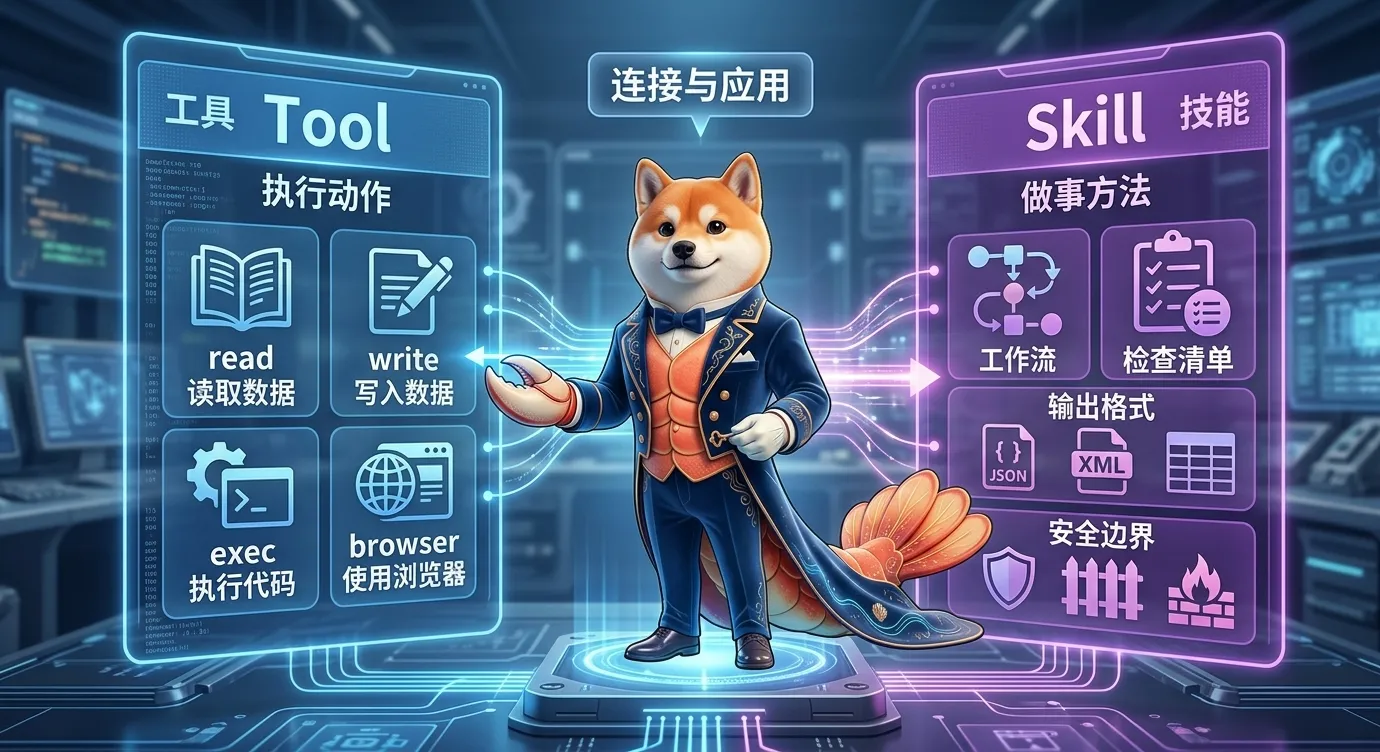
图:Tool 提供动作能力,Skill 提供做事流程。一个好的 Skill 会指导 Agent 何时使用哪些工具,以及如何验证结果。
二、什么时候该写 Skill?
并不是所有 prompt 都值得变成 Skill。
我建议满足下面任意两条,就可以考虑写 Skill:
- 这个任务会重复出现
- 每次都有固定流程
- 每次都容易漏步骤
- 输出格式需要稳定
- 涉及一套专有知识或内部规范
- 涉及特定工具组合
- 涉及安全边界,比如先只读、再确认
- 涉及可复用脚本或模板
适合写 Skill 的任务
| 任务 | 为什么适合 |
|---|---|
| 写固定风格博客 | 有结构、格式、配图、语气要求 |
| 安全巡检 | 有固定检查顺序和不能乱改的边界 |
| 数据报表 | 有固定字段、指标和输出格式 |
| API 调试 | 有接口文档、鉴权、常见错误 |
| 图片处理 | 有固定尺寸、格式、压缩流程 |
| 发布流程 | 有检查清单、命令、回滚步骤 |
不适合写 Skill 的任务
| 任务 | 为什么不适合 |
|---|---|
| 一次性聊天 | 没必要沉淀 |
| 很宽泛的“变聪明” | 没有明确触发条件 |
| 完全依赖临场判断 | Skill 容易写成废话 |
| 只是一句偏好 | 放到用户偏好或 AGENTS.md 更合适 |
| 涉及危险自动操作但没边界 | 先设计安全流程 |
一句话:
Skill 不是万能提示词仓库,而是稳定工作流的封装。
三、Skill 的基本结构
OpenClaw 使用 AgentSkills-compatible skill folders。
最小结构是:
1 | my-skill/ |
更完整的结构可能是:
1 | my-skill/ |
其中:
SKILL.md:必须有scripts/:可选,放可执行脚本references/:可选,放需要按需读取的参考文档assets/:可选,放模板、图片、字体、示例工程等输出资源
SKILL.md 是核心
每个 Skill 至少要有:
1 | --- |
前面的 YAML frontmatter 很重要。
它决定 Skill 的身份和触发条件。
后面的 Markdown body 是 Skill 被触发后,Agent 才会读取的具体说明。
四、name 和 folder 要对齐
Skill 名称建议:
- 小写字母
- 数字
- 连字符
- - 不要空格
- 不要中文名
- 尽量短
- 最好能表达动作或领域
好例子:
1 | blog-writer |
不太好的例子:
1 | 我的超级技能 |
文件夹名和 frontmatter 里的 name 最好一致:
1 | skills/blog-writer/SKILL.md |
1 | --- |
如果名字不一致,后面排查会很麻烦。
五、description 决定 Skill 什么时候被发现
很多新手写 Skill,最容易忽略 description。
但它非常关键。
OpenClaw 文档里强调:
name和description是模型决定什么时候使用 Skill 的主要依据。
也就是说,Skill 的正文不是一直塞进上下文的。
Agent 会先看到 metadata。
如果 description 看起来相关,才会加载 SKILL.md body。
所以 description 不能太空。
不好的 description
1 | description: A useful skill. |
这等于没说。
好一点
1 | description: Write Hexo-compatible Chinese OpenClaw tutorial articles with front matter, image placeholders, image prompts, common pitfalls, summary, and next lesson preview. |
它说明了:
- 任务领域:Hexo 中文 OpenClaw 教程
- 输出格式:front matter、配图占位、提示词
- 结构要求:常见坑、总结、下节预告
这就更容易被正确触发。
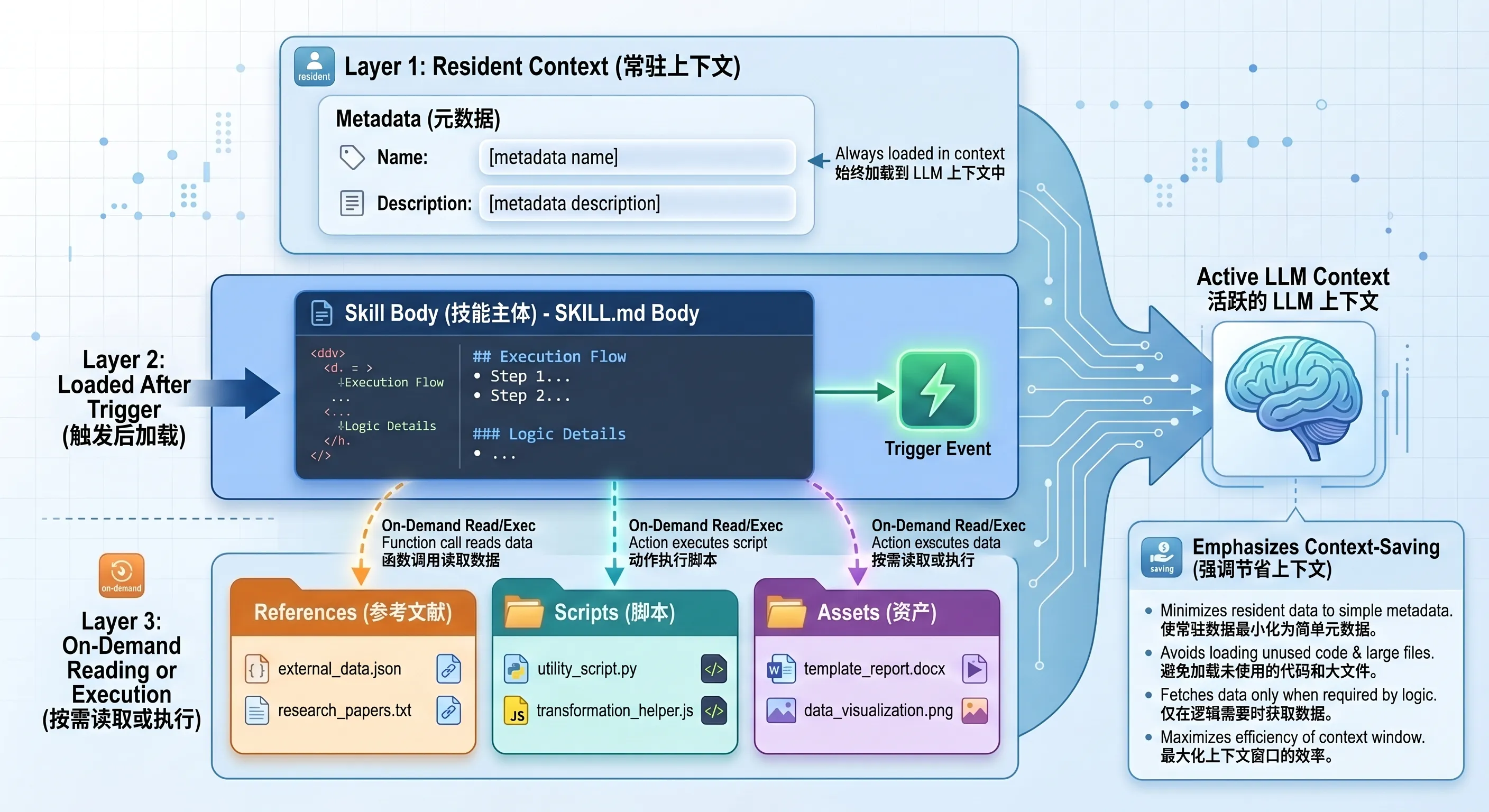
图:Skill 采用渐进加载:metadata 常驻,SKILL.md 在触发后加载,references/scripts/assets 按需使用。
六、渐进加载:不要把所有东西都塞进 SKILL.md
Skill 创作里一个很重要的原则叫:
Progressive Disclosure。
可以理解成“渐进披露”。
也就是:
- metadata 永远在上下文里
- SKILL.md body 只在 Skill 触发后加载
- scripts / references / assets 只在需要时使用
这带来一个写作原则:
SKILL.md 要短,参考资料要拆。
不要把 2 万字 API 文档塞进 SKILL.md。
更好的做法是:
1 | api-helper/ |
然后在 SKILL.md 里写:
1 | For authentication details, read `references/auth.md`. |
这样 Agent 只在需要时读取对应文件。
上下文更省,效果也更稳。
七、一个最小可用 Skill:blog-writer
假设你想写一个“博客写作 Skill”。
可以这样创建目录:
1 | mkdir -p skills/blog-writer |
如果你的 OpenClaw workspace 是:
1 | ~/.openclaw/workspace |
那完整路径就是:
1 | ~/.openclaw/workspace/skills/blog-writer/SKILL.md |
在当前教程工作区里,则可以是:
1 | /root/.openclaw/workspace-openclaw-tutor/skills/blog-writer/SKILL.md |
写入:
1 | --- |
这就是一个最小可用 Skill。
它没有脚本,也没有参考资料。
但已经能把一套写作流程固定下来。
八、把 Skill 放在哪里?
OpenClaw 会从多个位置加载 Skills。
优先级从高到低大致是:
| 位置 | 作用域 |
|---|---|
<workspace>/skills |
当前 agent 工作区,优先级最高 |
<workspace>/.agents/skills |
当前 workspace agent |
~/.agents/skills |
本机个人 agent skills |
~/.openclaw/skills |
本机共享 skills |
| OpenClaw bundled skills | 内置 skills |
skills.load.extraDirs |
自定义额外目录,优先级最低 |
如果同名 Skill 出现在多个地方,高优先级的会覆盖低优先级。
新手建议:
先放在当前 workspace 的
skills/目录。
因为它最容易理解,也不会影响所有 agent。
等你确认稳定后,再考虑放到共享目录或发布到 ClawHub。
九、让 OpenClaw 重新加载 Skill
写完 Skill 后,需要让 OpenClaw 看到它。
通常有几种方式。
新开会话
1 | /new |
重启 Gateway
1 | openclaw gateway restart |
查看 skills 列表
1 | openclaw skills list |
如果你想看某个 Skill:
1 | openclaw skills info blog-writer |
如果有多个 agent,可以指定:
1 | openclaw skills list --agent <id> |
文档里也提到,skill watcher 开启时,skill 变更会在下一次 agent turn 被刷新。
但排错时,新开会话最简单。
十、怎么测试一个 Skill?
测试不要只看 skills list。
skills list 只能说明它被发现。
还要测试它是否会被正确触发。
可以用:
1 | openclaw agent --message "请写一篇 Hexo 中文 OpenClaw 教程" |
或者直接在聊天里说:
1 | 请用教程文章风格写一篇 OpenClaw browser 工具入门。 |
看它是否:
- 按 Skill 里的结构写
- 没漏 front matter
- 有配图占位
- 有生图提示词
- 没编造命令
- 会先查本地 docs
测试 Skill 的关键不是“有没有触发”四个字。
而是:
触发后,输出是否更稳定、更少漏步骤。
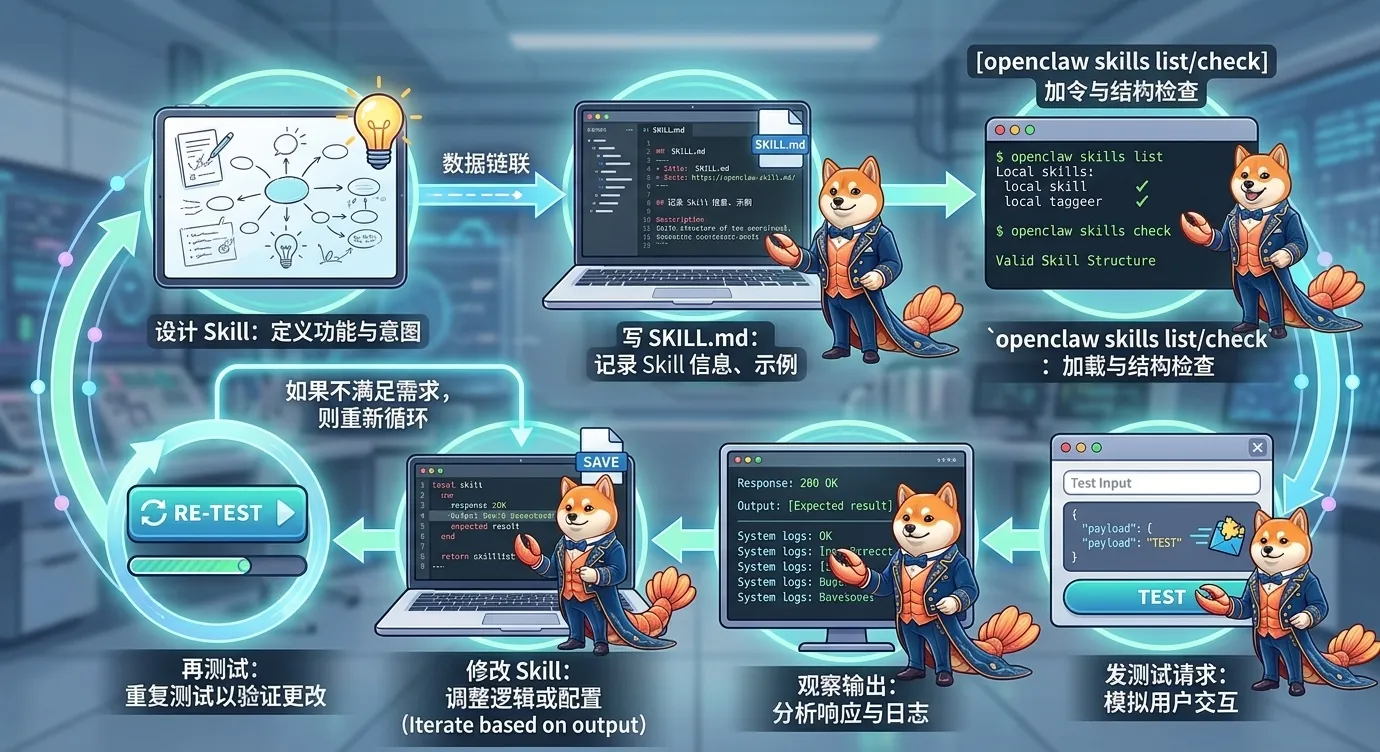
图:写 Skill 后要经历创建、加载、测试、观察输出、修改、再测试的循环。
十一、scripts:什么时候该放脚本?
如果一个任务每次都要重写同一段代码,就该考虑放脚本。
适合放 scripts 的情况:
- PDF 转换
- 图片批量压缩
- CSV 清洗
- 固定格式校验
- 文件重命名
- 生成图表
- 调用内部 API 的固定封装
结构示例:
1 | invoice-extractor/ |
SKILL.md 里可以写:
1 | Use `scripts/parse_invoice.py` when extracting invoice fields from local PDF or image OCR output. |
脚本的好处是:
- 稳定
- 可测试
- 省上下文
- 少重复生成代码
但也要注意:
脚本不是安全豁免。
如果脚本会删文件、联网、执行 shell、写系统目录,就要明确写边界。
十二、references:什么时候该放参考资料?
如果一个 Skill 需要大量领域知识,不要全塞进 SKILL.md。
放到 references/。
适合放 references 的内容:
- API 文档
- 数据库 schema
- 公司术语表
- 内部流程
- 常见错误码
- 输出模板说明
- 安全策略
- 长篇示例
结构示例:
1 | api-debugger/ |
SKILL.md 里写:
1 | When debugging authentication, read `references/auth.md`. |
这样 Agent 不会一上来吞完整文档。
只在需要时读取。
十三、assets:什么时候该放资源?
assets/ 放的是输出时可能用到的素材,不一定要读进上下文。
适合放 assets 的内容:
- PPT 模板
- Word 模板
- Markdown 模板
- logo
- 字体
- boilerplate 项目
- 前端组件模板
- 示例图片
比如:
1 | slide-builder/ |
或者:
1 | frontend-starter/ |
原则是:
references 是给 Agent 读的,assets 是给 Agent 用的。
十四、不要把 Skill 写成一本书
Skill Creator 指南里有一个很重要的原则:
Concise is Key.
上下文窗口是公共资源。
Skill 不应该把模型本来就知道的常识重复一遍。
不好的写法:
1 | # 写作 Skill |
这种内容没什么价值。
更好的写法:
1 | ## Required output |
也就是:
少讲人格,多讲约束;少讲废话,多讲步骤。
十五、给 Skill 合适的自由度
Skill 不是越详细越好。
它应该根据任务风险和稳定性决定自由度。
高自由度
适合:
- 写文章
- 头脑风暴
- 方案设计
- 研究总结
写法:
1 | Use judgment based on the user's goal. Prefer practical examples and concise structure. |
中自由度
适合:
- 代码审查
- API 调试
- 报表生成
- 发布说明
写法:
1 | Follow this checklist, but adapt section order when the input lacks a field. |
低自由度
适合:
- 数据迁移
- 安全加固
- 文件批处理
- 发版流程
- 容易误删或误操作的任务
写法:
1 | Do not run write commands until the user confirms the plan. Use the exact script in scripts/validate.py before applying changes. |
一句话:
越危险、越脆弱、越重复,就越需要窄护栏。
十六、Skill 里的安全边界怎么写?
一个好的 Skill 不只写“怎么做”,还要写“什么时候不做”。
尤其涉及:
exec- 文件写入
- 删除
- 外部 API
- 发消息
- 修改配置
- SSH / 防火墙
- 真实账号或支付
都要写清楚。
比如 healthcheck 类 Skill 应该写:
1 | Do not modify firewall, SSH, users, services, or update policy without explicit user approval. |
图片处理 Skill 可以写:
1 | Before destructive edits, create a copy. Never overwrite the only original unless the user explicitly asks. |
发布 Skill 可以写:
1 | Never deploy directly from a dirty worktree. Run tests first. Ask for confirmation before pushing tags or publishing packages. |
这就是 Skill 和普通 prompt 的区别。
Skill 是长期会被复用的,安全边界必须写进去。
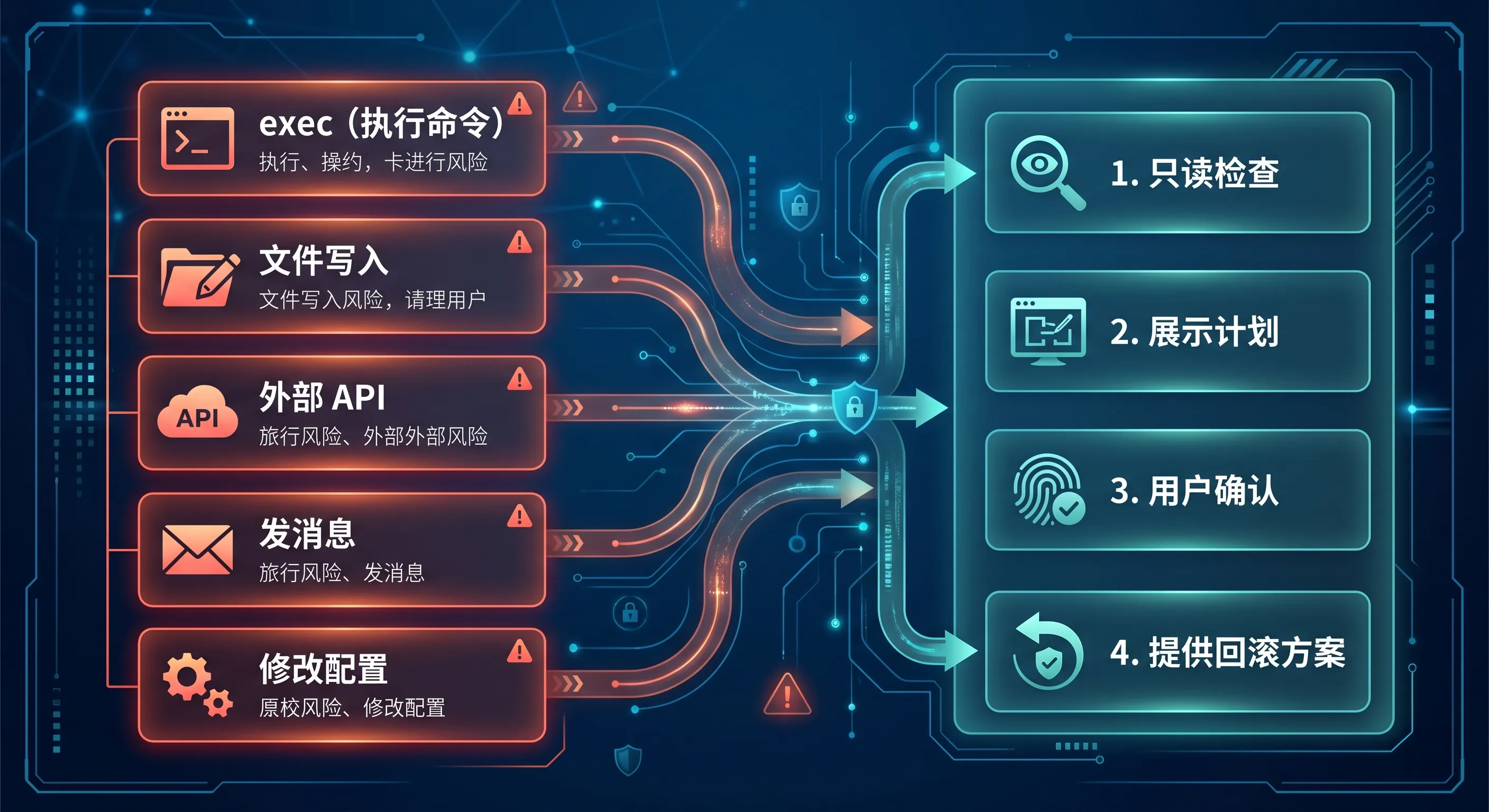
图:涉及 exec、文件写入、外部 API、发消息、配置修改的 Skill,都要明确只读检查、确认步骤和回滚边界。
十七、Skill metadata 里的 gating
OpenClaw 支持用 metadata 过滤 Skill 是否可用。
比如某个 Skill 只适合 Linux:
1 | --- |
比如需要某个二进制:
1 | --- |
比如需要环境变量:
1 | --- |
注意文档里提醒:
OpenClaw embedded agent 的 parser 对 frontmatter 支持单行 key,metadata 建议用单行 JSON。
所以不要把 metadata 写成很复杂的多行 YAML。
十八、Skill allowlist:不是所有 Agent 都要看到所有 Skill
在多 Agent 环境里,可以控制不同 Agent 能看到哪些 Skill。
配置示例:
1 | { |
规则:
agents.defaults.skills是默认 allowlist- agent 没写
skills就继承 defaults - agent 写了非空 skills,就用它自己的最终列表
- agent 写
skills: [],就是不暴露任何 Skill
这很适合:
- writer agent 只看写作 Skill
- ops agent 只看运维 Skill
- locked-down agent 不加载任何 Skill
- 实验 Skill 只给测试 Agent
十九、第三方 Skill 要当成不可信内容
OpenClaw 支持从 ClawHub 安装 Skill。
常用命令:
1 | openclaw skills search "calendar" |
但要记住:
第三方 Skill 要当成不可信内容。
安装前建议:
- 看
SKILL.md - 看 scripts 有没有危险操作
- 看 references 有没有奇怪指令
- 看是否要求 API key
- 看是否会联网
- 看是否会写文件或执行命令
- 尽量在 sandbox 下测试
文档也提醒:第三方 skills 要 read before enabling。
ClawHub 有扫描状态,但扫描不能替代人工判断。
二十、一个完整示例:server-readonly-check Skill
下面写一个更实用的最小 Skill。
目标:让 Agent 做服务器巡检时坚持只读,避免上来就改防火墙或 SSH。
路径:
1 | skills/server-readonly-check/SKILL.md |
内容:
1 | --- |
Linux examples:
1 | uname -a |
macOS examples:
1 | sw_vers |
1 |
|
Agent 很难知道什么时候用。
2)SKILL.md 太长
把所有 API 文档、历史说明、安装教程都塞进去。
应该拆 references。
3)没有触发场景
Skill 里没写:
1 | Use this skill when... |
Agent 触发会不稳定。
4)没有安全边界
涉及 exec / 文件 / API,却没写什么时候必须问用户。
5)把 Skill 当插件
Skill 主要是指导流程。
如果你要新增真正的 provider、channel、tool,应该看插件开发。
6)不测试
写完不跑 openclaw skills check,也不发测试请求。
结果以为 Skill 生效了,其实没被加载或没触发。
二十二、Skill 创作检查清单
写完一个 Skill 后,用这张表检查。
1 | [ ] folder name 和 name 一致 |
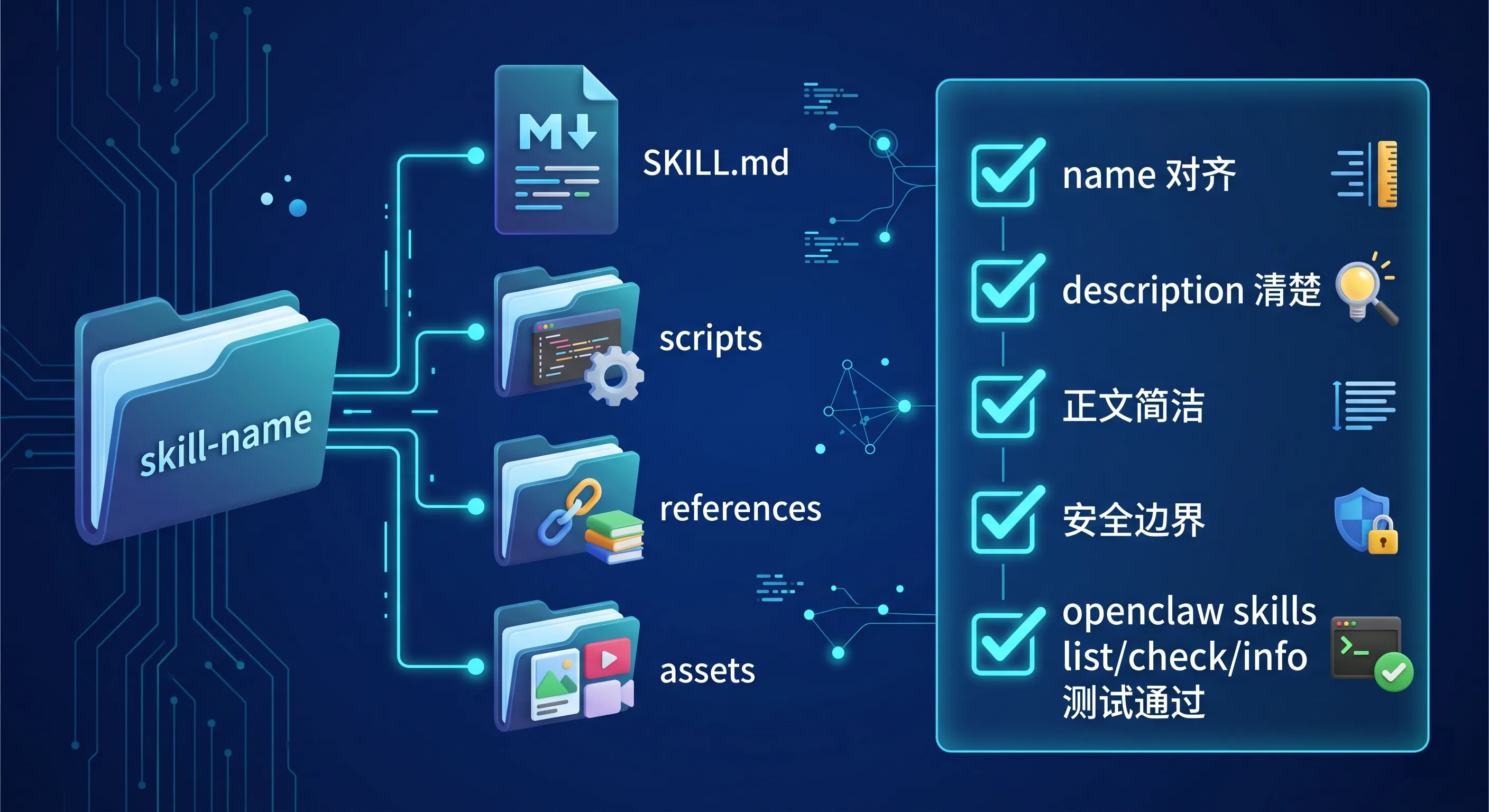
图:一个好 Skill 应该结构清楚、frontmatter 准确、正文简洁、资源按需拆分,并通过本地 list/check/实际请求测试。
二十三、适合新手的提问模板
1)设计一个 Skill
1 | 我想把一个重复工作流做成 OpenClaw Skill。请先帮我判断它是否适合写 Skill,再设计 name、description、SKILL.md 结构、references/scripts/assets 是否需要。 |
2)优化 description
1 | 请帮我优化这个 Skill 的 description,让它更容易在正确场景触发,但不要写得太宽泛。 |
3)审查 SKILL.md
1 | 请帮我审查这个 SKILL.md:是否太长、是否有明确触发场景、是否有安全边界、是否应该拆 references 或 scripts。 |
4)把 prompt 变成 Skill
1 | 下面是一段我经常复制给 OpenClaw 的 prompt。请帮我把它改造成一个最小可用 Skill,包括 frontmatter 和 Markdown body。 |
5)测试 Skill
1 | 请帮我测试当前 workspace 的 skills:运行 openclaw skills list、openclaw skills check,然后设计 3 条能触发这个 Skill 的测试请求。 |
6)安全审查第三方 Skill
1 | 请帮我审查这个第三方 Skill 是否安全:重点看 scripts、exec、文件写入、外部 API、环境变量、是否要求敏感密钥,以及是否适合 sandbox 测试。 |
二十四、这一课最值得记住的一句话
如果今天只记一句话:
Skill 是把可复用经验写成 Agent 能长期遵守的工作方法。
再记一句创作原则:
SKILL.md 要短,description 要准,危险操作要有边界。
二十五、总结
今天这节课,我们从零讲了如何写一个 Skill:
- Skill 是可复用工作方法,不是普通 prompt 仓库。
- 重复、稳定、容易漏步骤的任务适合写 Skill。
- 一个 Skill 至少需要目录和
SKILL.md。 - frontmatter 里
name和description很关键。 - description 决定 Skill 是否容易被正确触发。
- SKILL.md body 只在 Skill 触发后加载。
- 长参考资料应该放到 references。
- 重复代码和确定性流程可以放 scripts。
- 模板和输出资源可以放 assets。
- 不要把 Skill 写成一本书。
- 危险操作必须写清安全边界。
- 第三方 Skill 要先审查,再启用。
- 写完要用
openclaw skills list/check/info和真实请求测试。
Skill 的价值,不是让 Agent 多背一段话。
而是让你的经验可以复用:
1 | 第一次你教它 |
这就是 OpenClaw 从“能聊天”走向“能沉淀方法”的关键一步。
下一课预告
下一课我们会讲:
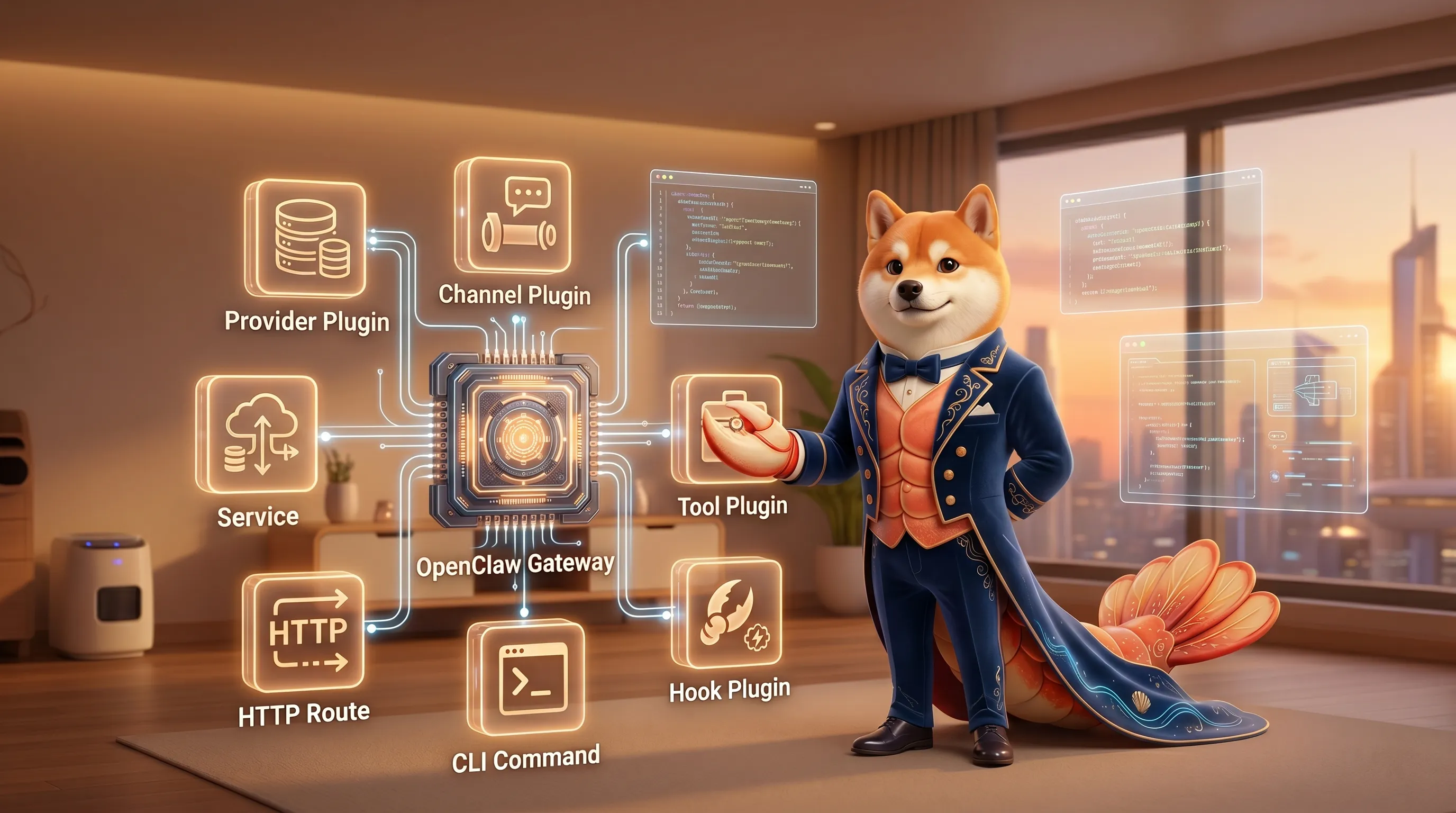
第 30 课:插件开发入门——SDK 概览
会重点讲:
- Skill 和 Plugin 的区别
- 插件能提供哪些能力
- provider / channel / tool / hook 插件大概怎么分
openclaw.plugin.json是什么- 什么时候该写插件,而不是写 Skill
- 插件开发的安全边界和测试思路
🦞 本文由八条撰写,持续更新中。